
Maximizing TikTok Engagement Through Localized Hashtags and Trends
December 12, 2025How to Use TikTok Analytics to Perfect Your US Posting Schedule
December 13, 2025Table of Contents
- Why Your TikTok US Posting Schedule Matters
- How the TikTok Algorithm Influences Reach: Timing, Trends, and Discovery
- Comparing TikTok Scheduling Tools and Management Services
- Advanced Tips: Troubleshooting, Experimentation, and Staying Ahead
- Frequently Asked Questions About TikTok US Posting Schedules
- Conclusion: Your Roadmap to TikTok Success Through Smart Scheduling
The best TikTok US posting schedule starts with 1 to 3 daily posts during your audience’s top activity windows in their local US time zone. Use TikTok analytics (Follower Activity and Top Territories) to select morning, midday, and evening windows, then run weekly A/B tests in nearby 30 to 60 minute slots. Keep the winners, rotate one test slot each week, and review results every 30 days to refine your TikTok US posting schedule. For the how-to, see analytics and testing in Section 3 (#analytics) and scheduling best practices in Section 4 (#scheduling).
- Use Follower Activity to pick initial windows
- Align to your audience’s local time zone
- Test adjacent 30 to 60 minute slots weekly
- Keep 2 winners, rotate 1 test slot
- Reassess every 30 days with analytics
Why Your TikTok US Posting Schedule Matters
You’re posting consistently. The videos are solid. Yet reach has plateaued, and nothing seems to break through. A creator I coached was in the same spot until we aligned her posts to when her US audience was actually active. We didn’t change the creative. We changed the clock.
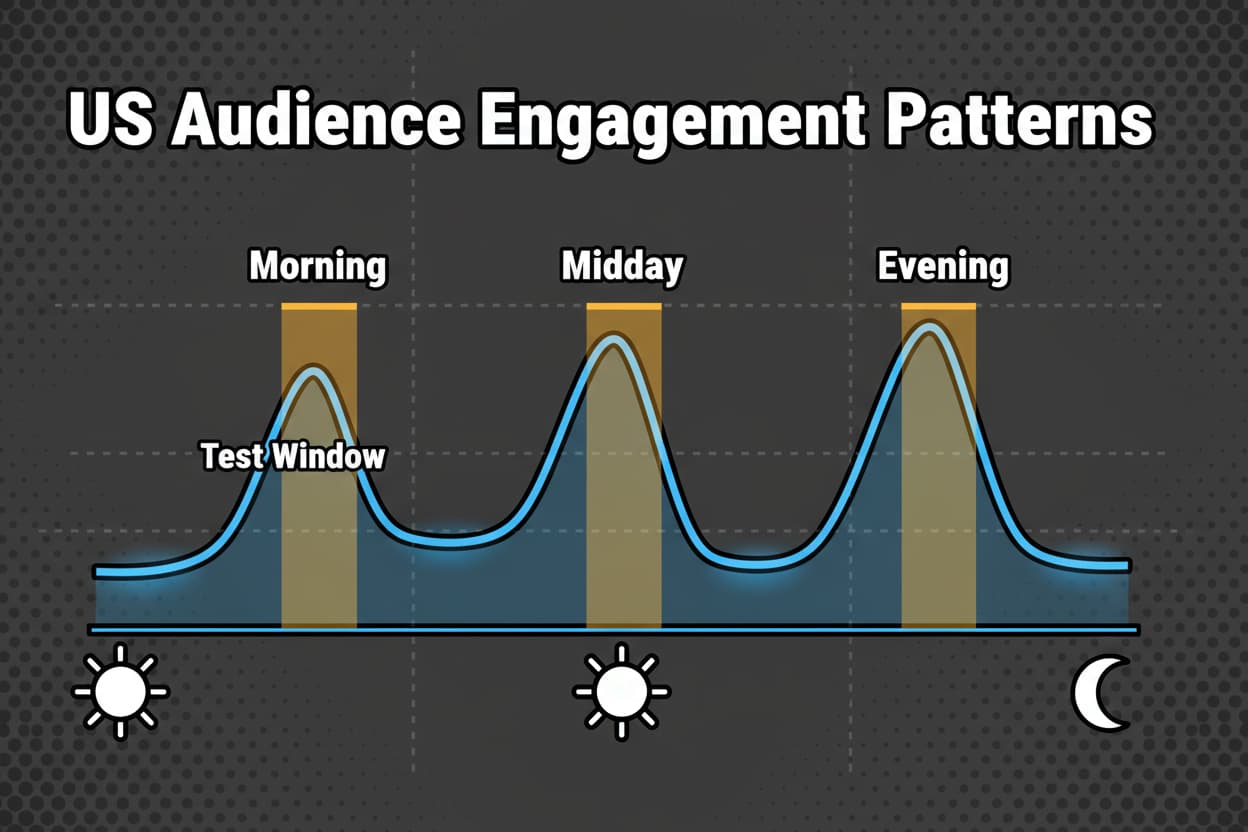
That shift is the point. Your TikTok US Posting Schedule is one of the few growth levers you fully control. TikTok’s system listens hard in the first minutes to hours. If you post when your audience is online, you raise the odds of fast watch time, saves, and shares. Those early signals feed recency and engagement velocity, which can unlock wider distribution.
Timing sounds simple. It is. It’s also misunderstood. Many guides shout a single “best time” and call it a day. The truth is more practical. Your best windows come from your own TikTok analytics and direct testing, not generic claims. Timing has been called a simple but misunderstood lever for a reason, and your data is how you make it work for you [reference:1]. When you combine timing with a measurement habit, you get steady, compounding improvements in TikTok reach and consistency [reference:2].
Here’s what typically happens. You post into your audience’s peak windows, engagement lands faster, and the For You Page tests you with more viewers. You don’t need viral magic. You need repeatable timing and a plan to keep refining it.
Let’s clear up a few myths so you can move forward with confidence.
- “If the content is good, timing doesn’t matter” – early signals still determine who sees it next
- “There’s one universal best time to post” – peaks vary by niche, time zone, and audience habits
- “The algorithm will find my audience regardless” – timing accelerates discovery by feeding it fast signals
You’ll see a practical, evergreen system in this guide. We’ll explain how the algorithm uses early signals, then show you how to pull Follower Activity and Top Territories, pick starting windows, and run weekly 30 to 60 minute tests. You’ll also get simple checklists and a clean calendar model that fits your workload.
If you want to jump straight to the data workflow, head to TikTok analytics in Section 3 (#analytics). If you’re ready to map your schedule for the week, see the best practices in Section 4 (#scheduling).
Most creators don’t need more complexity. They need clarity, a schedule they’ll actually follow, and a way to measure what’s working. Treat timing as a controllable variable, not a guessing game. The rest of this guide shows you exactly how.
How the TikTok Algorithm Influences Reach: Timing, Trends, and Discovery
Let’s unpack why timing changes what happens on the For You Page. TikTok tests every new post with small batches of viewers. What happens in the first minutes to hours sets the tone. The system looks at watch time and completion, then shares, saves, comments, and likes. Fast positive signals tell TikTok the video is relevant. Recency matters too, since fresh content can earn more testing when your audience is actively swiping.
That’s why time zones aren’t a side note. If your followers live in US regions that are three hours apart, their “active windows” are not the same. Posting into a dominant zone’s peak gives you the early engagement bump you need to expand distribution. Posting when most of your followers are asleep can throttle that early velocity.
Trends add another layer. When you join a trend, freshness matters. You want a “trend slot” in your schedule that is flexible. That slot ensures you can publish timely content while still protecting your core peak windows. Use the trend slot when a sound, meme, or topic aligns with your niche. If there’s nothing relevant, fill it with planned content and keep your cadence tight.
Here’s a simple scenario to visualize timing’s impact. Same video, same hook, same caption.
- Off-peak post: You publish late at night with few followers active. The first hour produces weak watch time and minimal shares. TikTok keeps testing limited batches, and the video plateaus. Little reach beyond followers.
- Peak post: You publish early evening when your audience is clustered online. The first hour shows stronger watch time and saves. TikTok expands testing to more viewers. Reach grows and stabilizes across the next day.
Nothing changed in the creative. The clock did. Timing is often presented as simple yet misunderstood, but operationalizing it with data is what makes it reliably effective [reference:1].
So how do you measure this for your account? Use a slot-by-slot tracking habit. For each time window you use, compare medians at two checkpoints: 1 hour and 24 hours. Medians smooth out outliers, so a single viral outlier doesn’t skew your view of a time slot. Over a few weeks, you’ll see which windows consistently deliver better early watch time and share rates. That’s your signal to keep or rotate slots. This is what analytics-led decision-making looks like in practice [reference:2].
Let’s tie in audience behavior across US time zones. If your audience is mostly Eastern and Central, pick windows that overlap both. If you’re split between East and West, run one late-morning slot that captures East lunch and West mid-morning, then an early evening slot for West that’s still acceptable for East. Your goal is simple: maximize the number of followers who are likely to engage in the first hour without overcomplicating the plan.
You also want to protect trend freshness. Keep one daily slot flexible for timely content. When you see a trend that fits your niche, use that slot even if it slightly misses your perfect peak. If it’s not time-sensitive, aim for the closest peak or an adjacent 30-minute window to boost early signals.
Avoid the common mistakes that quietly tank distribution:
- Posting at random times and hoping the algorithm compensates
- Ignoring TikTok analytics for Follower Activity and Top Territories
- Chasing a single static “best time” instead of testing adjacent windows
One more thing before we move on. Timing isn’t a magic trick that replaces compelling content. It amplifies early relevance signals. When you combine strong hooks with the right windows, you give the algorithm what it needs to push your video further. That’s how you build durable TikTok reach.
Next up, you’ll learn how to pull the exact data you need and turn it into a plan you can run every week. Start with Follower Activity and Top Territories in Section 3 (#analytics). When you’re ready to operationalize your cadence and protect trend slots, jump to scheduling best practices in Section 4 (#scheduling). Your results will come from consistent execution, slot-level comparisons at 1 hour and 24 hours, and the discipline to keep what works and rotate the rest [reference:2][reference:1].
Finding Your Optimal TikTok Posting Times: Analytics and Data-Driven Strategies
Your best TikTok posting times come from your data, not guesses. Here’s the exact workflow that turns TikTok analytics into a schedule you can trust, then refine with simple, focused tests.
Start in TikTok analytics. Open Follower Activity and scan the hourly graph. You’re looking for 2 to 3 clear peaks, plus neighboring hours that are almost as strong. Those adjacent hours are where your micro-tests will live.
Now check Top Territories. If your audience is mostly in the United States, map those peaks to the right US time zones. Heavy Eastern and Central? Favor overlapping windows. Split East and West? Plan a dual-slot approach and rotate tests to keep both coasts covered. An analytics-first approach removes guesswork and continuously sharpens your timing [reference:2].
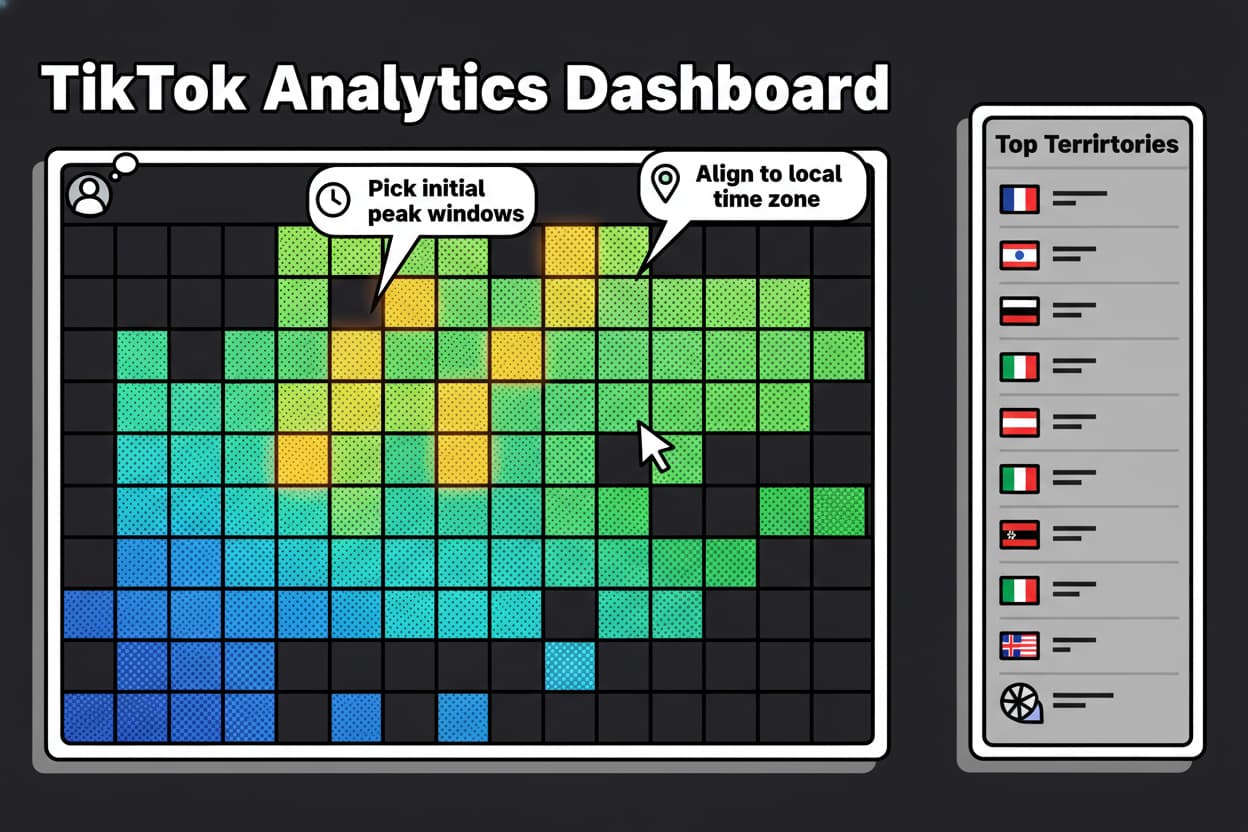
Validate your windows with content-level metrics. Prioritize average watch time and completion rate. Next, look at shares, saves, comments, and likes. Views come last. For each time slot you test, compare medians at 1 hour and 24 hours. Medians keep outliers from skewing your calls. Require a minimum sample per slot before deciding, typically 5 to 10 posts. Keep decisions current by using rolling windows so recent performance matters more than older runs [reference:2].
Here’s how to structure your testing and turn it into a system you can run forever.
Introduce the 3-Layer Timing Model. Layer 1 is Core peaks, your 2 to 3 highest-activity windows. Layer 2 is Test windows, small weekly experiments in adjacent 30 to 60 minute slots near your peaks. Layer 3 is Edge hours, a single off-peak slot you probe weekly for niche segments like night-owls or shift workers. This model balances consistency with discovery.
Wrap it in the 30/60/90 Optimization Loop. Days 0 to 30: Baseline. Pick three windows from analytics, log every post by slot, and compare 1-hour and 24-hour medians. Days 31 to 60: Iterate. Keep your two best slots, rotate one test slot weekly, prune weak performers, and re-test adjacent times. Days 61 to 90: Codify. Freeze winners as your default schedule, document your playbook, and set monthly review triggers. Then repeat the loop.
Standardize how you capture each post and slot test so analysis is fast and objective. Use this testing worksheet header in a spreadsheet:
Date | Time slot (local) | Time zone | Content pillar | Hook concept | Video length (s) | Hashtag set | Goal KPI | Views (1h) | Views (24h) | Avg watch time (s) | Completion rate (%) | Shares | Saves | Comments | Likes | Engagement rate per view | Outcome (win/hold/kill) | Next step
And for each micro-test, keep an Experimentation Log so you never confuse variables:
Hypothesis | Variable (time slot) | Control (best slot) | Sample size | Result summary | Decision (keep/kill/iterate) | Follow-up test
Let’s talk US time zone tactics. If you’re heavy ET/CT, choose a late morning or early evening window that overlaps both. That way you maximize concurrent activity in the first hour. If you’re split ET/PT, anchor one late morning ET window (captures ET lunch plus PT mid-morning) and one early evening PT window (still acceptable for ET). Rotate your third slot weekly between ET and PT adjacent windows to keep learning without destabilizing your schedule.
A quick mini-scenario so you can see this in action. A creator with 60 percent ET and 25 percent CT opens Follower Activity and marks three peaks: 8 am, 12 pm, and 7 pm ET. She sets Core peaks at 8:30 am and 7 pm, then runs two adjacent tests: 12 pm vs 12:30 pm, and 6:30 pm vs 7 pm. Over three weeks, she logs 6 posts per slot and compares 1-hour and 24-hour medians for watch time and completion. The 7 pm slot wins clearly, 12:30 pm edges out 12 pm, and 8:30 am ties with 8 am, so she keeps 7 pm and 12:30 pm as winners and rotates the morning slot for the next cycle. Her creative, captions, and hashtags stay constant while she isolates the time variable, which is why the results are clean [reference:2].
To keep this simple and skimmable, here’s your analytics-to-action flow:
- Pull Follower Activity to find 2 to 3 peak hours and mark adjacent test windows
- Cross-check Top Territories and convert peaks to local US time zones
- Log every post with the testing worksheet and set a clear Goal KPI
- Compare slot-level medians at 1 hour and 24 hours, prioritizing watch time and completion
- Keep two winners, rotate one adjacent test slot weekly, and use rolling windows for decisions
One last point. Don’t chase a universal “best time to post on TikTok.” Your schedule will beat generic advice because it reflects your audience’s actual behavior and your content’s real performance. That’s how you build a durable TikTok content strategy that keeps working as your account grows [reference:2].
Measurable action step: Run 6 posts per slot across 3 weeks, then keep the two slots with the highest 1-hour watch time medians and rotate one adjacent test slot for the next 30-day cycle.
Best Practices for Scheduling TikTok Posts in the US
You’ve got windows. Now turn them into a reliable TikTok US Posting Schedule you can execute daily without guesswork. The goal is consistency first, then steady refinement through testing and review.
Start with frequency you can sustain. For most US accounts, 1 to 3 posts per day is the sweet spot. Map each daily post to a content pillar so your output stays balanced: education, product, behind-the-scenes, community, or trend. If you only have capacity for one daily slot, protect your best core window and use a smaller weekly test cadence to keep learning.
Balance peak windows with freshness. Not every post should pile into the same peak. Use your strongest window for your highest-confidence content, then place secondary posts in adjacent windows where competition may be lighter. Keep one flexible “trend capture” slot daily. If a relevant trend pops, that slot is ready. If not, publish planned content there. This keeps your TikTok scheduling practical and opportunistic without disrupting your core windows.
As your audience evolves, watch for analytics deltas. If your Follower Activity peak shifts earlier or later, nudge the slot by 30 minutes and test. If watch time or completion in a window slides below your slot median for multiple posts, rotate in an adjacent test. Treat these signals as prompts to adjust, not as emergencies. Timing remains a simple lever that pays off when you maintain it intentionally, not reactively [reference:1].
Translate your plan into a week-in-view calendar so the team knows what’s going out, when, and why.
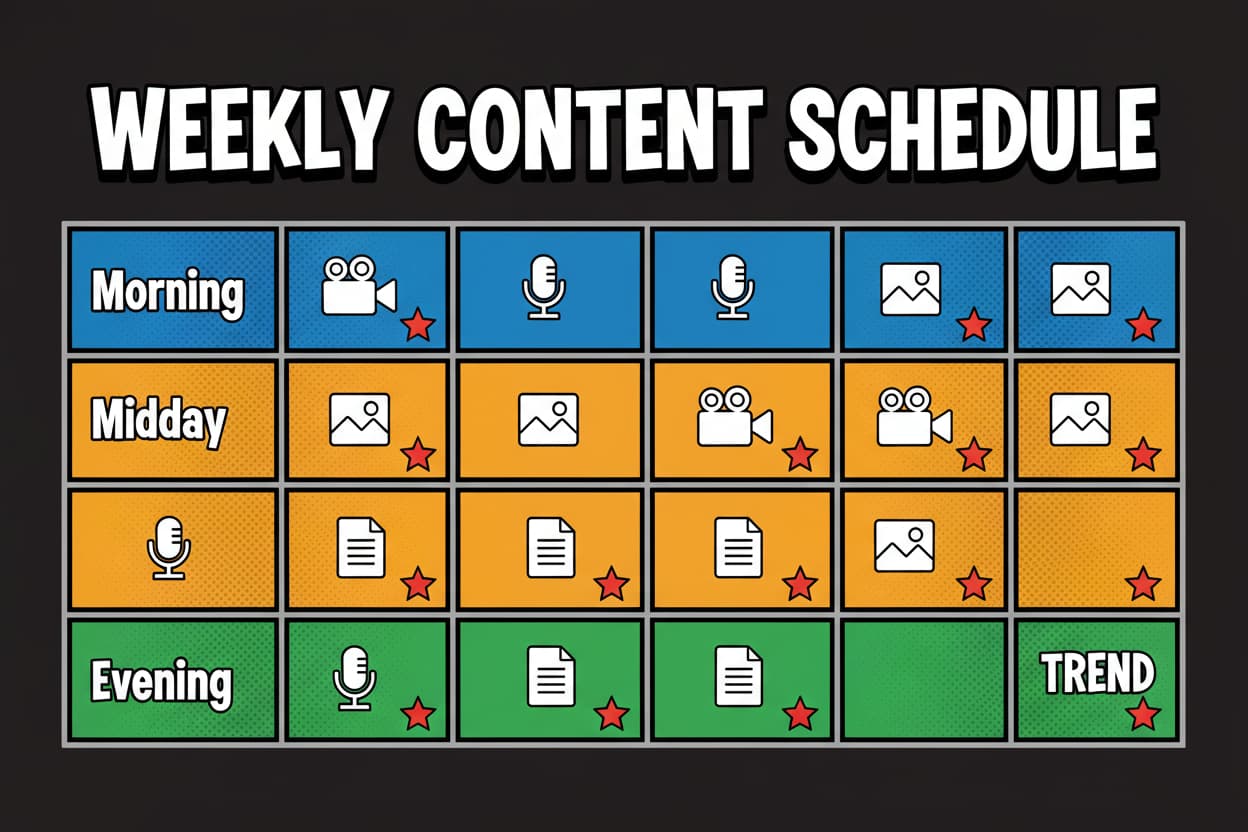
Make the calendar actionable. Label each slot by local time and pillar. Tag one slot per day as the trend capture slot. Assign owners. Add your slot labels to scheduled drafts so performance can be attributed back to the window in your worksheet.
Before you publish, run a quick Scheduling Checklist as inline steps so you avoid a second list in this section. Confirm Top Territories and your dominant US time zone. Select three initial windows from Follower Activity and align them to local time. Map content pillars to those windows so you don’t over-index one format. Reserve one daily trend capture slot. Enable notifications for the first 30 minutes after each post so you can reply quickly and amplify early engagement. Log posts in your testing worksheet. Schedule a 30-day review to update winners using 1-hour and 24-hour medians.
Then, keep your cadence sharp with a single Weekly Review Checklist. This is the one list you’ll run every week, fast:
- Compare each slot’s 1-hour and 24-hour medians for watch time and completion
- Pick one underperforming slot to replace with an adjacent 30–60 minute test
- Check Follower Activity for any peak shifts and adjust slot times by 30 minutes if needed
- Audit hooks using retention curves to ensure the first 2 seconds earn a pause
- Set next week’s tests, owners, and any trend capture priorities
- Update the shared calendar and add slot labels to scheduled drafts
Let’s ground this with a mini-scenario. A US CPG brand runs two stable slots and one rotating test. The stable slots are late morning ET (overlaps ET/CT) and early evening PT (still viable for ET). Each day, they protect a trend capture slot in the afternoon. On Tuesday, a relevant challenge emerges, so they drop it into the trend slot the same day, keeping their morning and evening posts unchanged. Every Friday, they run the Weekly Review Checklist. The past week shows the late morning ET slot slipping on 1-hour watch time, so they shift it 30 minutes earlier for the next three tests, then re-evaluate medians at the next review.
If your audience is split, use overlapping windows. For ET/CT overlap, a late morning slot often catches both zones while people are active. For ET/PT splits, pair one late morning ET window and one early evening PT window. Rotate the third slot weekly to test adjacent times across zones. This keeps your learning continuous and your schedule stable.
Two final tips that keep your TikTok content strategy resilient. First, don’t overfit to a single standout post. That’s why you’re using medians. Second, document decisions. Add a one-liner to your Experimentation Log whenever you keep, kill, or iterate a slot. Over time, your log becomes a playbook the team can trust.
Measurable action step: Publish into your three selected windows for 30 days, rotate one adjacent test slot weekly, and consolidate winners using slot-level medians at 1 hour and 24 hours. Then lock your two best windows and keep one test slot rolling for the next 30 days of iteration.
Comparing TikTok Scheduling Tools and Management Services
You’ve picked your windows and set a cadence. Now you need a stack that makes TikTok scheduling fast, accurate, and measurable. The right setup helps you hit peak windows without scrambling, label each post by slot, and export clean numbers so you can compare medians at 1 hour and 24 hours with confidence.
Start simple. If you run one profile and don’t need approvals, native TikTok scheduling often covers the basics. You can set an exact date and time, align to your audience’s local time zone, and publish reliably into your chosen windows. Pair that with TikTok analytics to read Follower Activity and Top Territories, then test adjacent 30 to 60 minute slots as you learned earlier. This basic loop is enough for many creators, especially when you log each post in your testing worksheet and keep your Experimentation Log tight [reference:2].
As your operation grows, complexity creeps in. Multiple profiles mean overlapping windows across time zones. Team workflows introduce approvals and roles. Stakeholders want dashboards that show slot-level performance, not just total views. That is where third-party tools or TikTok management services can save time and protect your schedule.
What native TikTok scheduling does well
Native tools are built for direct control. You can draft, schedule, auto-publish, and engage in real time. Because scheduling happens inside the platform, you avoid disconnects between planned times and actual publish times.
It also aligns cleanly with your TikTok analytics workflow. You can pull Follower Activity, map Top Territories, choose three windows, and schedule into those exact slots. If you label each scheduled draft with the slot name in your internal notes, it becomes easy to log results against the right window later.
Where native tends to be light is collaboration and analytics overlays. You won’t get advanced approval workflows, role-based access, or cross-profile slot labels that roll up into reports. If you need those, you’ll look to a platform.
Feature-led comparison matrix
Use this matrix to see how native scheduling and common platforms line up on evergreen capabilities. Values are directional, not marketing claims, and focus on fit for timing, testing, and analytics workflows.
| Capability | Native TikTok | Hootsuite | Later | Buffer | Sprout Social | Metricool |
|---|---|---|---|---|---|---|
| Auto-publish | Yes | Yes | Yes | Yes | Yes | Yes |
| Time zone handling | Yes | Yes | Yes | Yes | Yes | Yes |
| Analytics overlays | Basic | Advanced | Advanced | Moderate | Advanced | Advanced |
| Follower activity visualization/approximation | Basic | Advanced | Advanced | Moderate | Advanced | Advanced |
| Approval workflow | Basic | Advanced | Moderate | Moderate | Advanced | Moderate |
| Role-based access | Basic | Advanced | Moderate | Moderate | Advanced | Moderate |
| Content library | Basic | Advanced | Advanced | Moderate | Advanced | Moderate |
| Trend monitoring hooks | Manual | Integrations | Integrations | Limited | Integrations | Integrations |
| UTM/link tracking | Limited | Yes | Yes | Yes | Yes | Yes |
| Multi-profile management | Limited | Yes | Yes | Yes | Yes | Yes |
| Performance labels by slot | Basic | Advanced | Advanced | Moderate | Advanced | Advanced |
| Mobile scheduling support | Yes | Yes | Yes | Yes | Yes | Yes |
How to read the matrix
Think of Basic, Moderate, and Advanced as depth markers. Basic means you can do it, but mostly by hand, often with workarounds like internal notes and spreadsheets. Moderate adds convenience for small teams, with some overlays or approvals. Advanced is for multi-profile workflows where you need slot labels, dashboards, role-based controls, and standardized exports.
Map capability depth to your workflow. If you run weekly slot tests and a monthly consolidation, analytics overlays and performance labels by slot speed up your review. If multiple people touch the calendar, you’ll want approval workflow and role-based access. If you post trend content after hours, trend hooks and mobile support matter more. Tools that make slot-level analysis easier help you refine faster with TikTok analytics at the center [reference:2].
Selection guidance tied to your timing frameworks
Your stack should serve the 3-Layer Timing Model and the 30/60/90 Optimization Loop, not the other way around. At minimum, you need:
- Reliable auto-publishing into your three windows.
- Clear slot labeling so you can compare medians at 1 hour and 24 hours by window.
- Local time zone control for ET/CT overlaps and ET/PT splits.
- A fast way to rotate one adjacent test slot each week and keep two winners stable.
- Exportable data to calculate watch time and completion medians per slot, then shares, saves, comments, likes, and views.
If native scheduling plus a spreadsheet covers those needs, keep your setup lean. If your team is larger or your reporting needs are tougher, pick a platform from the table that fills the gaps without overbuilding.
Scheduling tool evaluation checklist
Use this quick checklist to choose a platform that supports timing tests and clean measurement. Keep it practical and feature-led.
- Analytics overlays that tag posts by time slot and show 1-hour and 24-hour performance
- Local time zone scheduling with profile-level defaults and clear ET/PT control
- Multi-profile management with slot labels you can standardize across accounts
- Approval workflows and role-based access that match your team’s steps
- Content library with reusable captions, hashtag sets, and search
- Trend monitoring hooks or reminders that support a daily trend capture slot
- UTM and link tracking for posts that drive off-platform actions
- Mobile scheduling and notifications for after-hours publishing and replies
- Exportable reports so you can compute slot-level medians and archive decisions
Mini-scenario: when to upgrade to TikTok management services
Imagine a consumer brand portfolio with five US profiles. One account is ET-heavy, another splits ET/PT, a third targets shift workers with late-night engagement, and two more run nationwide campaigns with frequent approvals. The team posts 2 to 3 times per day per profile, keeps a daily trend capture slot, and rotates one test window every week. Leadership asks for a weekly dashboard that compares slot-level medians across all profiles and highlights which windows should be kept or rotated.
Here’s what starts to break. The content team can schedule natively, but approvals slow them down. Analysts can compute medians in spreadsheets, but ad-hoc exports take hours. No one is on call for a trend that explodes after normal hours. And when Follower Activity shifts on one profile, other teams don’t see it in time.
This is where TikTok management services layer on top of your tools to give you coverage and standardization without rewriting your playbook. An agency sets a shared slot taxonomy, so every post across all profiles carries a standard label. They build dashboards that calculate 1-hour and 24-hour medians for watch time and completion by slot, then shares, saves, comments, likes, and views. They run the 3-Layer Timing Model for each profile, keep two winning windows stable, and rotate one adjacent test weekly. After-hours, they monitor your daily trend capture slot and post when a relevant trend pops, keeping creative aligned to the Signal Readiness Checklist.
Approvals are handled with a clear workflow and role-based access. Stakeholders get a single weekly summary that calls out which windows are outperforming, which tests to run next, and whether any Follower Activity peaks have shifted. The result is not more content. It is better clock management and faster iteration across multiple accounts. That is the point of upgrading to TikTok management services when volume, time zones, and approvals make in-house coordination fragile.
Put it all together
Pick the smallest stack that fully supports your timing workflow. If native scheduling lets you publish into your three windows, label each post by slot, and calculate slot-level medians at 1 hour and 24 hours, stay native and keep your spreadsheet tight. If you need collaboration, cross-account analytics overlays, and standardized exports, add a platform that matches your process. Only bring in TikTok management services when complexity, after-hours coverage, or stakeholder reporting justifies it.
Whatever you choose, tie every feature back to your core loop. Post into your audience’s peaks, rotate one adjacent test weekly, compare medians, and keep the winners. Tools should make that cycle easier, faster, and more accurate, not more complicated [reference:2].
Advanced Tips: Troubleshooting, Experimentation, and Staying Ahead
Your schedule is set. Now keep it sharp. When reach dips or results wobble, use a structured path to isolate whether timing, creative, or trend-fit is the issue. This is where being methodical saves weeks.
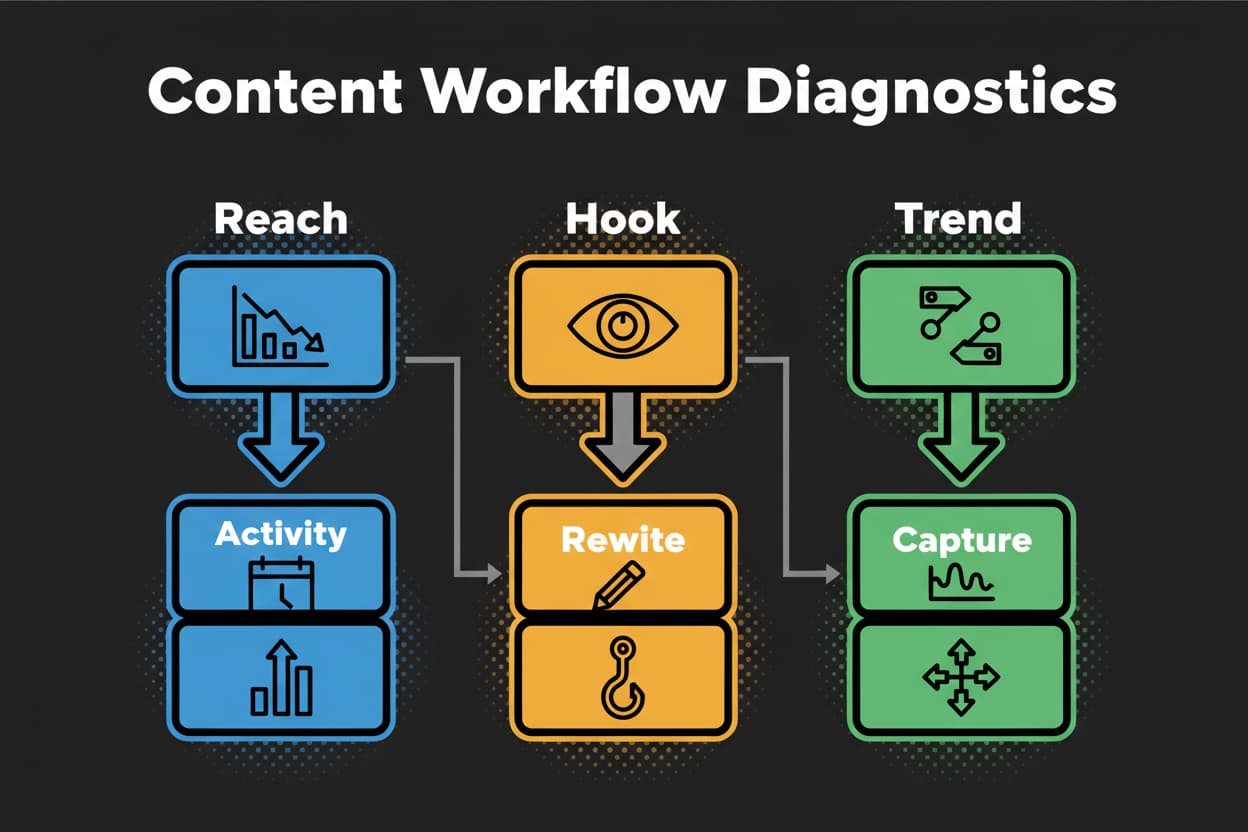
Start with timing. Check Follower Activity to see if peaks shifted or flattened. Peaks move as audience routines change. If your top window slid earlier, slide your slot by 30 minutes and run three tests. Confirm with slot-level medians at 1 hour and 24 hours, prioritizing average watch time and completion rate before you look at shares, saves, comments, likes, and views.
Next, confirm you posted into the correct time zone. Top Territories can drift. If US distribution tilts from ET/CT to more PT, rebalance windows so your first-hour engagement lands when those followers are active. Timing is a simple lever that’s often misunderstood in practice, but it’s controllable and powerful when you treat it like a testable variable [reference:1].
If timing aligns and reach is still soft, run the Signal Readiness Checklist before publishing. Strengthen the 2-second hook, tighten the caption and call to action, make sure your hashtag set is niche-aligned, and confirm the video length supports completion. If early retention is weak in the first 3 seconds, fix creative first. Analytics-driven iteration is what turns this into steady gains rather than guesswork [reference:2].
Lock in an experimentation cadence that’s light enough to run forever.
- Weekly micro-tests: shift one slot by 30 to 60 minutes, hold creative variables steady
- Monthly consolidation: compare medians at 1 hour and 24 hours, promote winners, prune laggards
- Quarterly playbook refresh: re-check Follower Activity and Territories, confirm your 3-Layer Timing Model and update your 30/60/90 Loop
Normalize your expectations with community data, but compare apples to apples. A B2B account with modest followers will not mirror a lifestyle creator with millions. Normalize benchmarks by niche and account size. When you swap notes in creator groups, ask for slot-level medians and audience time zone mix so you’re judging like-for-like.
Keep your Experimentation Log tight so you don’t repeat old tests. Add lines like this as you go:
Hypothesis | Variable (time slot) | Control (best slot) | Sample size | Result summary | Decision (keep/kill/iterate) | Follow-up test
Here’s a quick recovery scenario. A fitness creator’s evening slot drifts down on 1-hour watch time across four posts. Diagnostics show Follower Activity peaked 30 minutes earlier than usual. She moves the slot earlier by 30 minutes for three tests, rewrites the first 2 seconds to jump straight into the movement, and tags the slot on her worksheet. After six posts, the new slot’s medians beat the old one at both 1 hour and 24 hours, with share rate up. She keeps the earlier slot, documents the change in her playbook, and schedules a trend capture slot on leg days to ride relevant sounds when they spike.
Two guiding truths that keep you calm. Timing accelerates early signals but does not replace relevance [reference:1]. And measurement beats memory. If you log tests and decide by medians, your TikTok reach becomes a function of process, not luck [reference:2].
Frequently Asked Questions About TikTok US Posting Schedules
Q: How often should I post on TikTok for best results?
A: For most US accounts, 1 to 3 posts per day is a sustainable range. Map them to your 3-Layer Timing Model: two core peak slots and one rotating test or edge hour. If quality dips, protect your top two core windows and slow the third. Decide frequency based on resources and your ability to keep hooks strong. Measure slot-level medians at 1 hour and 24 hours and keep frequency where your watch time and completion stay healthy.
Mini-scenario: A solo creator drops from 3 daily posts to 2 after her hooks get thin. By protecting her evening and midday winners and using the morning as an occasional test slot, her 1-hour medians rebound and more videos clear early testing.
Q: Does posting at night hurt my reach in the US?
A: It depends on your audience. Night posts often underperform for US audiences unless your Follower Activity shows a late peak or you serve night-owls and shift workers. Use an edge-hour test once a week and judge by medians. If your 1-hour watch time and completion are consistently lower than your core slots, keep night posting for experiments only. Timing is a lever, not a cure. If a night slot wins on your account, keep it.
Mini-scenario: A gaming channel sees a 1 am ET bump. They add a weekly edge-hour test at 12:30 am ET. Over eight posts, 1-hour watch time is competitive and shares are higher than their midday slot, so they promote the edge hour to a rotating core slot and monitor.
Q: Can I schedule TikTok posts in advance?
A: Yes. Native scheduling works well for single profiles and simple workflows. If you manage multiple profiles, need approvals, or want slot-level labels and exports, add a scheduling platform. Either way, keep one daily trend capture slot flexible so you can move quickly. Schedule the rest into your three selected windows and label each draft by slot so analysis is fast. This is the analytics-first habit that compounds [reference:2].
Mini-scenario: A brand schedules a week ahead into morning, midday, and evening. When a timely trend hits, they swap the day’s trend capture slot and publish within minutes, leaving the two core slots untouched.
Q: How do I adjust my schedule for different US time zones?
A: Start with Top Territories to understand where your followers live. If ET and CT dominate, use overlap windows that catch both. If you’re split ET and PT, pair a late morning ET window and an early evening PT window, then rotate your third slot weekly across adjacent times in either zone. Use medians to decide. Keep the two slots that consistently deliver higher 1-hour watch time.
- Map the dominant US time zone mix from Top Territories
- Choose two overlapping windows to maximize first-hour activity
- Add one rotating test slot across adjacent times in the minority zone
- Compare slot-level medians at 1 hour and 24 hours, then consolidate
Mini-scenario: A retailer with 55 percent ET and 30 percent PT runs 11:30 am ET and 6:30 pm PT as core slots. The rotating test alternates between 8:00 am ET and 9:30 pm PT. After a month, 8:00 am ET underperforms, while 9:30 pm PT ties evening performance, so they keep both PT windows and find a new ET morning test.
Q: What if my analytics show inconsistent peak times?
A: Increase your sample size and switch to medians. Volatile peaks usually mean not enough data or changing creative variables. Standardize the first 2-second hook style, keep video length within a tight band, and run adjacent 30 to 60 minute tests around your suspected peak. Use a rolling window of the past 30 days for decisions. If variance persists, follow the Diagnostics Flow to check for audience shifts or trend misalignment, then adjust.
Mini-scenario: A recipe channel sees noon vs 12:30 pm ET trade places weekly. After standardizing hooks and running six posts per slot, noon wins on 1-hour watch time and share rate. They keep noon and test 11:30 am next.
Q: Should I post during trends even if it’s off my peak window?
A: If the trend is strongly relevant, yes. That’s why your daily trend capture slot exists. If the trend is mildly relevant and not time-sensitive, aim for your closest peak or an adjacent 30-minute window. Either way, log it as a trend slot and judge it separately so your core schedule isn’t distorted. Use the Signal Readiness Checklist to tighten hook and caption for trend-specific viewing.
Mini-scenario: A beauty creator drops a trend sound at 3 pm ET, which is off her usual peaks. The post’s 1-hour watch time underperforms core slots but outperforms previous off-peak content, so she keeps the trend slot strategy and limits off-peak posts to trends.
Q: How long should I test a new time slot before deciding?
A: Aim for 5 to 10 posts per slot. Use medians at 1 hour and 24 hours and prioritize watch time and completion. If a slot is clearly weaker after five posts and adjacent tests are stronger, you can make a provisional call and confirm once you hit eight. Decisions should use a rolling window so recent performance weighs more than older results. This is the spirit of the 30/60/90 Optimization Loop.
Mini-scenario: A DIY account runs five tests at 12:30 pm vs their 12:00 pm control. 12:30 pm edges ahead on 1-hour watch time and ties on completion, so they promote it and validate over the next three posts.
Q: Do weekends need a different schedule?
A: Not always. Some niches shift earlier or later on weekends, others hold steady. Check Follower Activity by day and look for weekend deltas. If you see a clear shift, create weekend-specific windows and run adjacent tests for two to three weeks. Keep your weekday winners as-is. Decide by slot-level medians, not assumptions.
Mini-scenario: A family-focused channel sees a late-morning weekend peak. They move their weekday 7 pm slot to 10:30 am on weekends. After eight weekend posts, 1-hour watch time is higher and completion steadier, so they keep the weekend window.
Q: How do I schedule for a split audience across time zones?
A: Use two stable windows that anchor each region and one rotating test that alternates weekly between zones. Label each post by slot and region in your worksheet. Over time, you’ll see whether it’s better to favor the dominant zone or keep perfect parity. Promote windows that win on 1-hour watch time and completion repeatedly, even if they favor one region.
Mini-scenario: An education brand balances ET and PT by keeping 12 pm ET and 6:30 pm PT as core slots and rotating a third test between 8 am ET and 9 pm PT. The PT night slot wins more often, so they favor PT at night and ET at midday.
Q: My audience is growing in a new region. How should I adapt my schedule?
A: When Top Territories shift, run a 30-day dual-window plan. Keep your two best US windows and convert your rotating test slot to a region-focused test at an adjacent peak in that new region. If the new region grows fast, consider duplicating one piece of content into a second localized window rather than cannibalizing your US peaks. Decide with medians at 1 hour and 24 hours, then update your playbook.
Mini-scenario: A lifestyle account with heavy ET gains followers on the West Coast. They keep ET midday and evening, then test an early PT evening slot as the rotating window. Once PT performance stabilizes, they duplicate one strong creative into PT night while preserving ET winners. Analytics-led decisions keep growth steady [reference:2].
Conclusion: Your Roadmap to TikTok Success Through Smart Scheduling
Timing is not a trick. It’s your simplest, most controllable way to amplify early signals and earn broader testing. A disciplined TikTok US Posting Schedule lets you meet your audience when they’re ready, fuel watch time and completion in the first hour, and turn small wins into durable reach.
Here’s your 5-step plan aligned to the 30/60/90 Optimization Loop. Treat each step as a short paragraph you can operationalize today.
1) Pull analytics. Open Follower Activity and Top Territories. Mark 2 to 3 strong daily peaks and convert them to local US time zone windows.
2) Choose three windows. Anchor two core peaks and reserve one slot for rotation or edge-hour tests. Label each window clearly.
3) Run weekly micro-tests. Shift one slot by 30 to 60 minutes and change nothing else. Track medians at 1 hour and 24 hours for watch time and completion first, then shares, saves, comments, likes, and views.
4) Keep winners, rotate one. Retain the two best slots by primary metrics and replace one underperformer with an adjacent test. Use a rolling window and minimum 5 to 10 posts per slot before calls.
5) Review monthly, codify quarterly. Consolidate your winners, document the playbook, and refresh your Follower Activity and Territories on a fixed cadence.
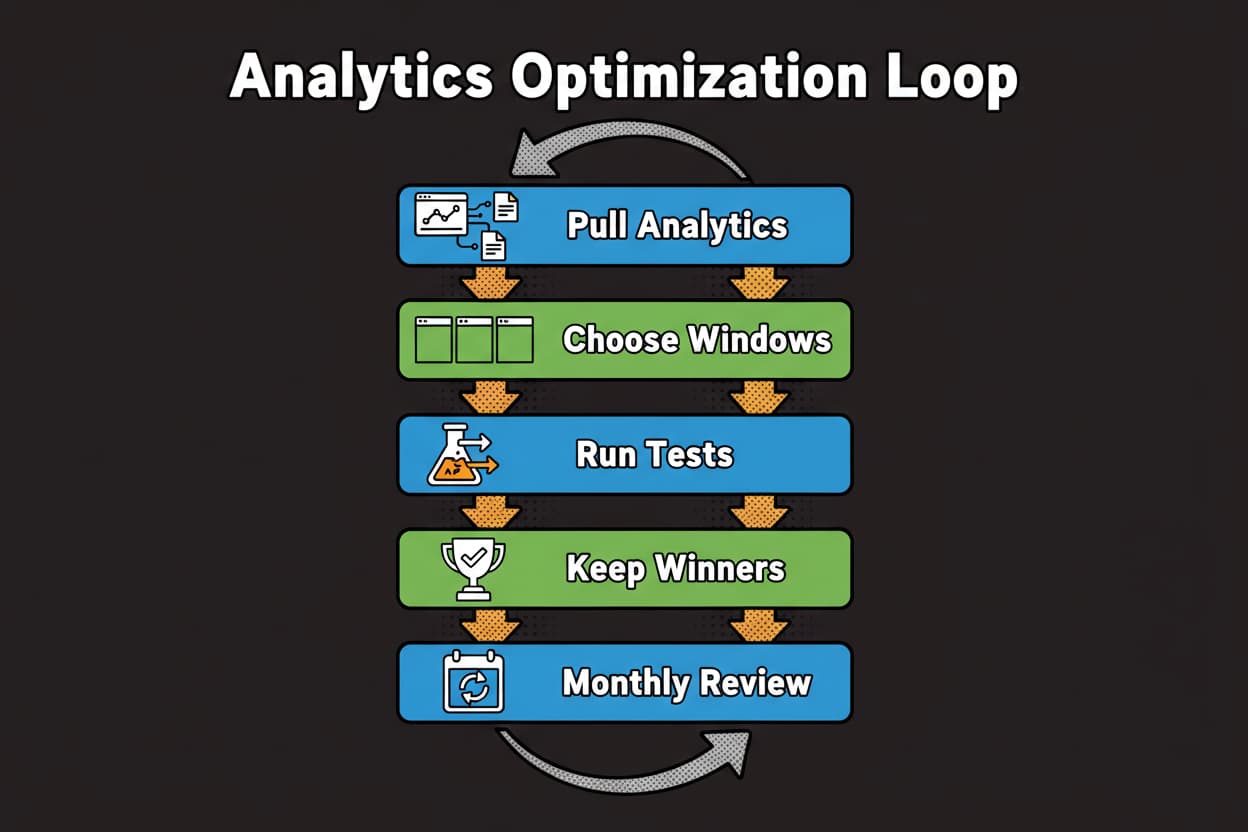
A quick mini-case to show how this plays out. A home decor creator labeled three windows from analytics: morning, midday, evening ET. She ran adjacent 30-minute tests weekly and made decisions by slot-level medians at 1 hour and 24 hours, prioritizing watch time and completion, then shares and saves. Within two review cycles, her evening median watch time improved, completion steadied across the midday slot, and more posts advanced into broader For You testing. Creative quality didn’t change. The clock did. She now maintains two proven slots, keeps one test rolling, and updates her playbook monthly. That’s a healthy schedule you can trust.
Your next move is simple. Pick your three windows, label them, and start logging. Keep decisions tied to medians and your measurement hierarchy. As your audience shifts, your schedule evolves. Keep the loop running and your TikTok reach will follow.
Key Takeaways
- Timing accelerates early signals; measure by 1-hour and 24-hour medians before changing windows
- Use the 3-Layer Timing Model: two core peaks, one rotating test, plus an edge-hour probe
- Decide with the metric hierarchy: watch time and completion, then shares/saves/comments/likes, then views
- Run weekly micro-tests, consolidate monthly, and refresh your playbook quarterly
- Protect a daily trend capture slot so timeliness never breaks your core schedule
- Compare like-for-like accounts when benchmarking, and normalize by niche and size
- Keep a tight worksheet and Experimentation Log so improvements compound over time